List of Blocks Which Are Compatible With Figma to Gutenberg Conversion in UiChemy
The full list of Gutenberg blocks UiChemy supports when converting a Figma design.
To turn your Figma design into a Gutenberg template with UiChemy, use the Gutenberg blocks it supports. Manually tag your elements with these blocks, when you export your design to WordPress, those elements use the specific blocks you tagged.
Checking the List of Supported Blocks
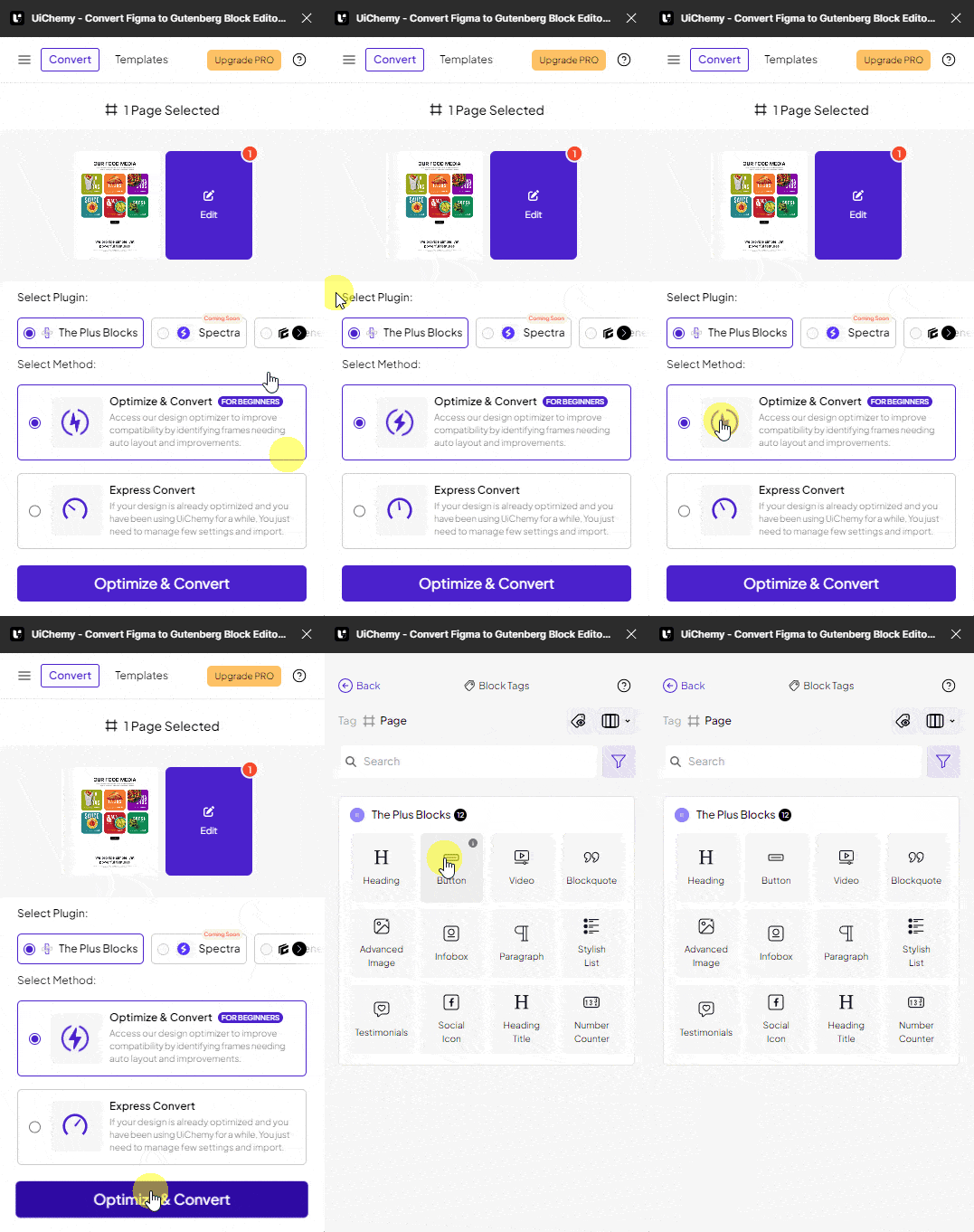
- Go to Resources → Plugins, search for UiChemy, and click on UiChemy - Convert Figma to Gutenberg Block Editor. This opens the plugin interface, log in to your account.
- Select the top-level frame of your layout, and select a Gutenberg plugin from the Select Plugin section.
- Select Optimize & Convert and click the button.
- Click the Block Tags tab in the UiChemy panel, you'll find all the supported blocks for the selected Gutenberg plugin here.
We'll continue to add more blocks to this list.
Supported Blocks: The Plus Blocks
- Heading
- Button
- Video
- Blockquote
- Advanced Image
- Infobox
- Paragraph
- Stylish List
- Testimonials
- Social Icon
- Heading Title
- Number Counter
Frequently Asked Questions
What are the supported blocks for Figma to Gutenberg conversion?
Heading, Button, Video, Blockquote, Advanced Image, Infobox, Paragraph, Stylish List, Testimonials, Social Icon, Heading Title, and Number Counter. Tag these correctly in your Figma design so they're recognized during export.
How do I find the list of compatible blocks in UiChemy?
Go to Resources → Plugins, open the UiChemy plugin, log in, select your layout's top-level frame, choose a Gutenberg plugin, and click Block Tags in the UiChemy panel.
Can I use UiChemy to convert Figma designs that include custom blocks?
No, UiChemy doesn't support blocks outside its predefined list. Elements using unsupported blocks may not convert properly.
What should I do if my Figma elements aren't converting to Gutenberg blocks?
Check that you've tagged them correctly with a supported block, and that you're using the latest version of the UiChemy Figma plugin with the appropriate Gutenberg plugin selected.
Are there any limitations when using UiChemy for Figma to Gutenberg conversion?
UiChemy only supports specific Gutenberg blocks, custom or unsupported blocks won't convert. It also only works with designs created in Figma.