What is the difference between Original Images and Figma's Exported Images in UiChemy Export Process?
Understand the difference between Original Images and Figma's Exported Images when exporting with UiChemy.
When you export your Figma design using UiChemy, you have the option to export the template with scaled images, where you specify the scale value. For scaling, UiChemy uses Figma's own export feature.
UiChemy imports modern image formats, including WebP and AVIF, alongside standard formats like PNG and JPG, so you don't need to convert images manually before exporting.
When you export images from Figma, they can be one of two types: Original Images and Exported Images. Here's the difference between them.
Original Images in Figma
- When you add an image in Figma, it stays at its original size and quality, both dimensions and file size.
- These images aren't modified until you explicitly export them.
- Using Original Images in UiChemy means the template includes the exact file you uploaded to Figma.
Exported Images in Figma
Figma provides an Export feature that lets you export images at various scales, from 0.5x to 4x. Exported images are resized versions of the original, their dimensions and file size change based on the scale you set.
In UiChemy, selecting "Use Figma's Exported Images" uses this export process. You can choose a preset scale or set a custom one (e.g. 1.8x).
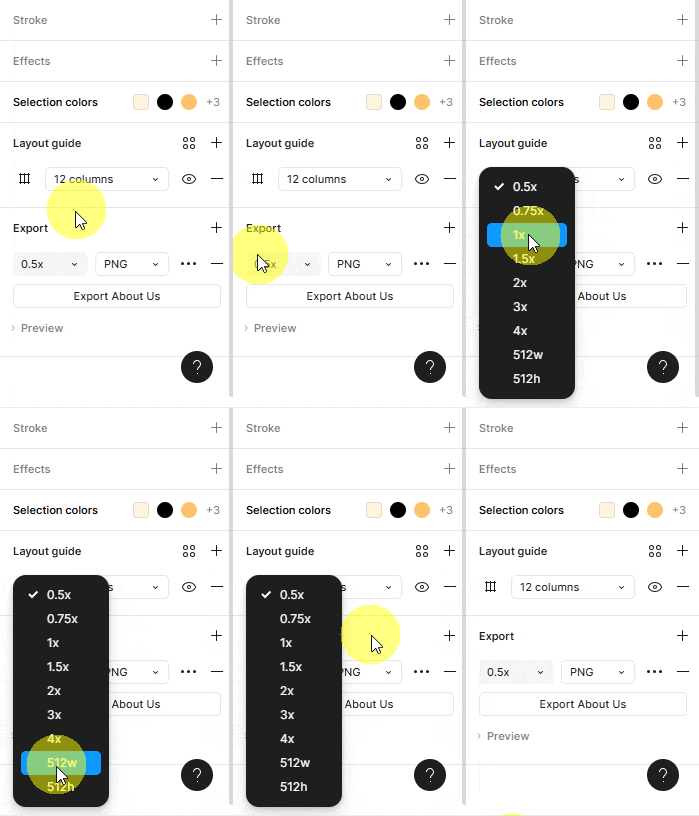
Using Exported Images with UiChemy
When you use the Use Figma's Exported Images option in UiChemy, it uses Figma's export feature to scale the images.
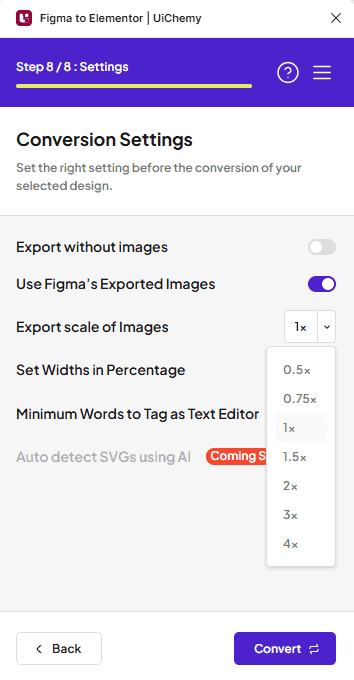
From the Export Scale of Images dropdown, select any of the provided values, or add a custom scale (e.g. 1.8x). Exporting at smaller sizes reduces template upload time and page load time in the browser, while larger sizes suit high-resolution displays or print-quality output.
If you make the image dimensions smaller than the width and height specified in the template, the image will appear pixelated.
Frequently Asked Questions
What is the main difference between Original Images and Exported Images?
Original Images retain their original size and quality until explicitly exported, while Exported Images are resized versions scaled from 0.5x to 4x, so Original Images are included exactly as uploaded, while Exported Images are modified based on your scaling settings.
How do I use Exported Images effectively with UiChemy?
Select a custom export scale from the dropdown to resize images appropriately, for example, 1.8x can balance quality and performance for high-resolution displays. Be careful scaling down too much, as it can cause pixelation.
What are the performance implications of using smaller Exported Images?
Smaller Exported Images significantly reduce template upload time and browser page load time, important for user experience, especially on mobile. Just make sure dimensions aren't reduced so much that pixelation becomes an issue.
What common mistakes do users make when exporting images from Figma?
Not adjusting the export scale, which can make images too large or too small for their intended use, and overlooking the pixelation that results from scaling down below the original dimensions.
Are there any limitations to using Original Images in UiChemy?
Original Images aren't resized or optimized during export, which can mean larger file sizes and potentially slower page load times if not managed carefully.