How to Generate Invoice after Purchase of UiChemy?
Generate and download an invoice for your UiChemy Pro purchase from the Posimyth Store.
To generate an invoice for your UiChemy Pro purchase, follow these steps:
- Visit the Posimyth Store and log in using the same login details you used at checkout.
- On the Dashboard page, click the Generate Invoice link.
- On the next page, fill in your billing details and click Save Billing Details & Generate Invoice.
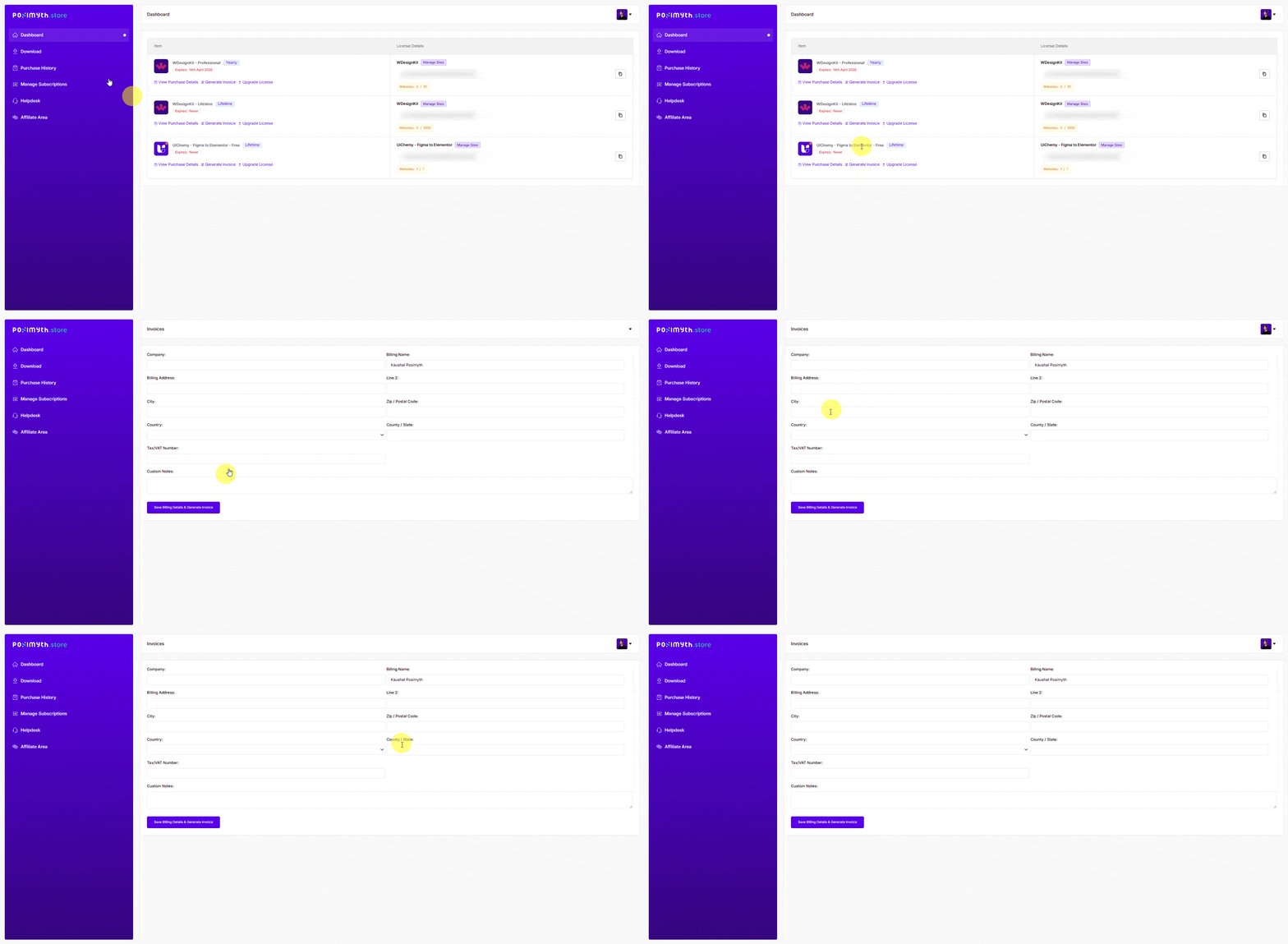
Your purchase invoice is then generated, and you can download it for your records.
If you run into any issues generating your invoice, reach out to our support team, we're happy to help.
Frequently Asked Questions
What should I do if I can't find the Generate Invoice link on my dashboard?
Make sure you're logged in with the same account used at checkout. Logging out and back in can help, or try clearing your browser cache.
What billing details do I need to fill in to generate my invoice?
Typically your name, address, and email, make sure everything is accurate before saving, since it affects the validity of the invoice.
What should I do if I need an invoice for a purchase made a while ago?
Log in and check if the Generate Invoice link is still available. If not, contact support to help retrieve records for previous transactions.